What happens between the alert and the fix, and why it takes so long.
How many integration incidents are open right now, across every team touching your Workday landscape?
How long has the oldest one been sitting there?
Is that number better or worse than it was last quarter?
Most organisations cannot answer any of the three. Not because the process is bad, but because nobody owns the middle of it.
The nine steps between a failure and a fix
Most Workday teams have alerting configured, and it works. What happens next is where the time goes.
1. The integration fails.
2. A notification fires to a distribution list.
3. Someone reads it.
4. Someone decides whether it is real.
5. Someone raises a ticket.
6. The ticket routes to a team.
7. That team works it.
8. Someone confirms it has recovered.
9. Someone closes it.
Steps three, four, five, eight and nine are people. Step six often moves the work into a different team, and sometimes into a different organisation.
Teams tell us their ticketing process is fragmented across multiple groups with no visibility of progress between them. Not that tickets go unresolved, but that no single person can see the line from failure to closure. Where a team does not have that capacity in house, our managed services cover it.
So the fix takes twenty minutes and the incident takes four days, and nobody can say where the other three days went.
Which step is the weak one?
Not the one most people would guess.
Detection gets the attention, but an alert only ever tells you one thing: this integration failed. Whether anyone reads it depends on who is at their desk that afternoon. What happens next depends entirely on that person’s judgement.
Does this failure matter, or is it cosmetic? What priority should it carry? Will anyone remember to check whether it recovered?
Automating the ticket does not fix it either. Where a notification raises a ticket by itself, every failure becomes a ticket whether it matters or not. The judgement has not moved. It has been removed, and what arrives instead is a queue nobody has triaged.
Either way, nobody decided in advance what actually deserves a ticket. That is not a criticism of anyone’s team. It is a statement about how the task is designed, and design is the thing you can change.
This is not a rare problem. Splunk and Oxford Economics surveyed 2,000 executives at some of the world’s largest companies for The Hidden Costs of Downtime. Two in five said customers are often or always the first to spot that something is down.
For a Workday integration landscape, the customer noticing first means an employee whose pay is wrong, or a new starter with no system access.
Decide once, instead of every time
Three things do the work in Incident Management. In plain terms:
A check. Insights inspects how every integration is built and tests it against a standing set of checks. A certificate signed with an algorithm no longer considered strong. An integration that has quietly got slower than its own previous schedules. A check can fail while every run still succeeds, so what surfaces is the warning sign, not the breakage.
A rule. A standing instruction saying which checks, or which run outcomes, should open an incident, and how serious it is. Because a run can be watched at amber rather than red, a rule can fire on a warning.
A scope. The integrations a rule applies to. Everything in the tenant, a few named integrations, or a tag across a group. One rule, written once, can cover fifty of them.
Put together. Tag your payroll integrations, then write one rule: if anything tagged payroll finishes in a red state, open a critical incident, worded the same way every time.
Write the rule once. From then on the incident gets raised whether anyone is at their desk or not.
An incident is a unit of work, not a notification
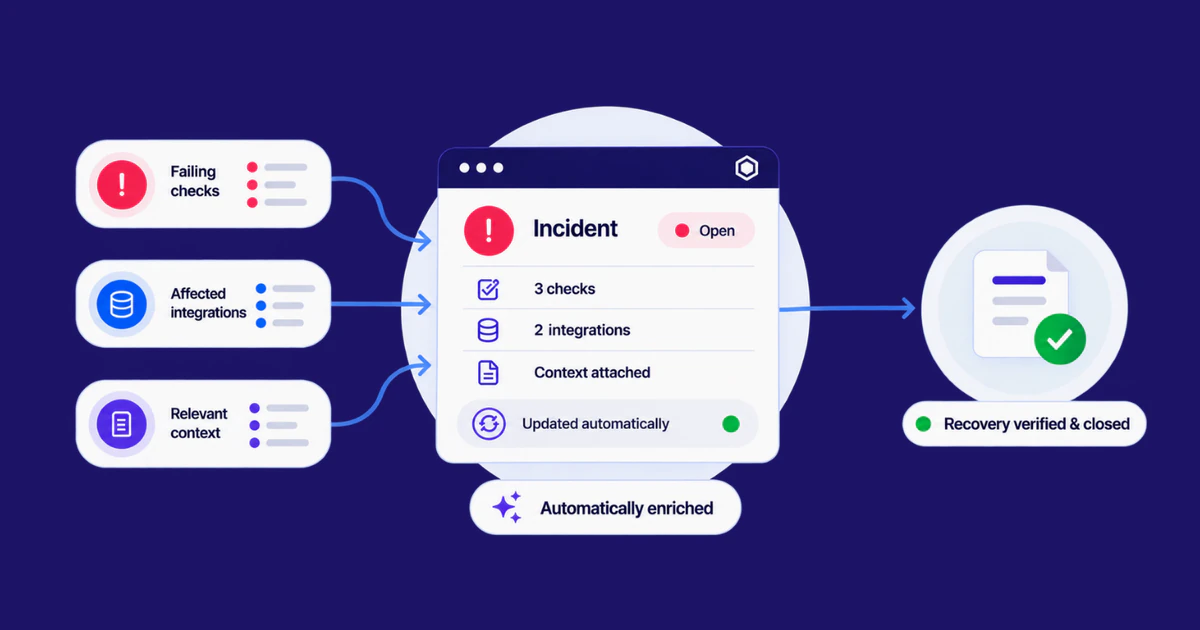
Every incident can be assigned to a person. It carries its own ticket number, moves through New, Active and Closed, and holds a priority. Insights records who created it, who owns it and who closed it, with the full history behind each.
A notification is a fact that arrived. An incident is a fact with a name against it.
When a rule raises one, it arrives with its evidence attached: the integrations affected, the check or run status that triggered it, and the rule behind it.
It does not have to start with something Insights spotted, either. Anyone can raise an incident against the tenant or against one integration, for anything at all. A change request. A fix agreed in a review that would otherwise live in someone’s notes.
Those sit in the same list, with the same owners and history. Which is what makes it one place rather than another feed to watch.
What you get back
Five of the nine steps depended on a person being available and making a good call. Here is what happens to them.
• Reading and judging, steps three and four. Gone from the moment of failure. The judgement was made once, calmly, when you wrote the rule.
• Raising the ticket, step five. The incident opens itself, carrying the integration, the reason behind it, and the priority the rule set.
• Confirming recovery and closing, steps eight and nine. The fix closes the ticket. The check passes again, the incident closes and timestamps itself, and that same passing check feeds the next daily health score.
• The warning instead of the break. Your team can act as something starts to drift, rather than after the failure that makes it everyone’s problem.
• A support model everyone can see. When a partner handles your integrations, the process usually looks the same. Raise a ticket and wait. By then the damage is done. Now the same incident is visible to your team, your partner and whoever oversees them, and leadership gets the backlog over time rather than a single moment.
Fewer tickets raised by hand, fewer left open after the fix, and a health score that moves as the work lands. All of it visible to the people who have to answer for it.
Back to the three questions
Most teams cannot answer them today. Not because anything is going badly, but because the answer has never lived in one place.
If you want to see those three questions answered on one screen, the Insights page is the place to start.