This page is about the word intsys inside Workday. If you were looking for IntSys Solutions, the Workday integration company, our home page is the place to start.
Two things with the same name
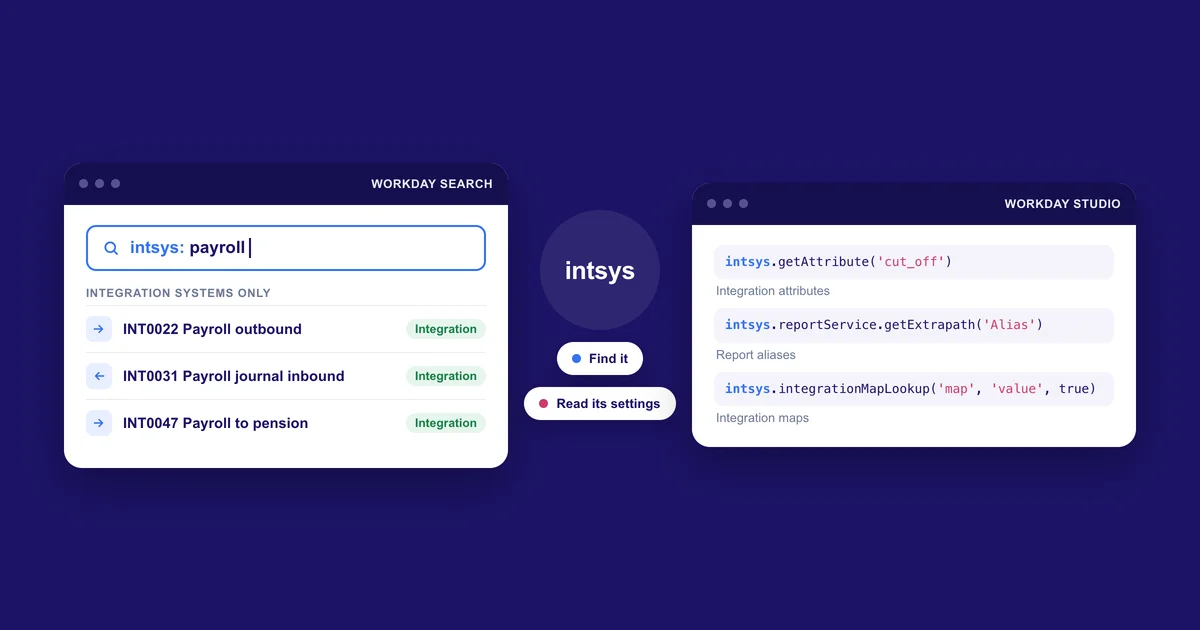
In Workday, intsys turns up in two places. In the search box, intsys: is a prefix that finds integration systems. In Workday Studio, intsys is an object an integration uses to read its own settings from the tenant.
Both refer to the integration system, so it's easy to search for one and land on the other. The sections below take them one at a time.
The intsys search prefix
Type intsys: into the Workday search box followed by part of a name, and Workday returns only integration systems whose names contain that text. Workday's own training material gives it as the way to find an integration system once it has been created.
A search such as intsys: payroll brings back every integration with payroll in its name. Many tenants start each integration name with an ID like INT0022, and the prefix finds those as well, which is why people search for exactly that kind of string.
It helps most in a large tenant, where a plain search for payroll also returns reports, tasks, business processes and people. With the prefix you get the integration systems and nothing else, and from a result you can open its related actions to launch it or look through its recent events.
Workday has similar prefixes for other kinds of object.
The intsys object in Workday Studio
Inside a Studio integration, intsys stands for the integration system the code is running as. You use it in MVEL expressions to read values that are configured in the tenant, so an administrator can change them without anyone redeploying the integration. You'll mostly meet it in three places.
Integration attributes
Attributes are settings defined on the integration system itself, such as a file name pattern or a cut off date. Workday describes them as static properties of the integration system and points developers to the intsys object for reading them.
intsys.getAttribute('attribute_name') returns a text or date value. intsys.getAttributeAsBoolean('attribute_name') returns true or false, and gives false if the attribute hasn't been configured. For attributes that hold Workday instances, getAttributeReferenceData returns one and getAttributeReferenceDataList returns a list. Versions of these methods that take a service name read the attributes of another connector in the same integration business process, and most integrations never need them.
Report aliases
When a Studio integration calls a custom report, the report is added to a report service in the integration and given an alias. The integration then asks intsys for the report's path at run time.
@{intsys.reportService.getExtrapath('WICT_ActiveEmployeesDetailsAlias')}
That expression goes in the Extra Path of the outbound REST call to Workday. It builds the path from the tenant, the report owner and the report name, so the integration keeps working if the report is renamed or passed to a new owner.
Integration maps
Integration maps translate Workday values into the values another system expects. intsys.integrationMapLookup('map_name', 'internal_value', true) returns the external values mapped to an internal one as a list, or null when nothing matches. A second form takes a reference ID type and a key for Workday objects, and intsys.integrationMapReverseLookup works in the other direction. Because the map lives in the tenant, a functional team can change a mapping without touching the code.
When it matters
Both come up when something goes wrong. The search prefix is usually the quickest way into an integration's event history after a failed run. The Studio object is often where a problem that only shows up in one tenant starts, because attributes, report aliases and maps are configured in each tenant and don't travel with the deployed code. We build Insights, which reads that event history across a whole tenant.
If you're working through a failure, our piece on what happens when a Workday integration fails covers the rest of the path from alert to fix.
About the name
IntSys Solutions is a Workday integration company founded in Derry in 2021 and part of HR Path since January 2025. The intsys prefix and the Studio object are Workday features and have nothing to do with our company. Workday is a trademark of Workday, Inc.